Showing posts with label my freebies. Show all posts

An Interesting Infographic on How to Use Popular Latin Phrases in APA Style

An Interesting Infographic on How to Use Popular Latin Phrases in APA Style
May 23, 2017
There are a number of popular latin verbs student researchers use in their papers such as etc., e.g., cf.,  and many more. However, these abbreviated forms have their own rules when it comes to formatting them in APA style. The visual below, which we created based on the official guidelines of the American Psychological Association, shows you how to properly use some of these latin abbreviations in APA style.  We invite you to check it out and keep a copy of this visual handy for the next research paper.

Related: Class poster on how to cite online sources in APA style
  This is how to use Some Popular latin Abbreviations in APA Style

10 Essential Apps to Help Elementary Students Learn Grammar

10 Essential Apps to Help Elementary Students Learn Grammar
May 17, 2017
Learning grammar can be more fun for students if it is taught through the use of interactive games and activities that both entertain and challenge students linguistic skills. Below are some popular iPad apps you can use with your younger learners to improve their grammatical skills. From learning about pronouns and punctuation marks to mastering the use of adjectives and superlative forms, these apps offer a wide variety of educational materials in the form of videos, lessons, guides, games, animated stories and many more so students can not only learn grammar but have fun while doing so. (links of the apps are under the visual)

10 Essential Apps to Help Elementary Students Learn Grammar

1- Grammaropolis
‘Grammaropolis uses the parts of speech as animated characters whose personalities are based on the roles they play in the sentence.’

2- Grammar For Kids
‘A perfect app for kids to practice the 8 parts of speech: Noun, Pronoun, Adjective, Adverb, Verb, Preposition, Conjunction and Interjection.’

3- Practice English Grammar
‘Improve your English grammar now with more than 1000 questions, 750+ flashcards and 100+ games. Learning by doing & tracking your progress!’

4- Grammar Hammer 7-10
‘Grammar Hammer lets kids find and fix grammar and spelling mistakes embedded in entertaining, illustrated stories. They are proofreading and editing these stories, while gaining skills they will use for the rest of their lives.’

5- English Grammar Punctuation Marks Game
‘The English Grammar Punctuation Marks Game lets you practice identifying different punctuation marks and how to properly use them.’

6- Grammar Fun Free
‘Grammar Fun allows kids of all ages to learn correct grammar by matching grammatical constructs to the corresponding words in a sentence. A child friendly interface makes this a fun filled activity.’

7- iGE: the interactive Grammar of English from UCL
‘The interactive Grammar of English (iGE) is a comprehensive introductory course in English grammar which takes you from the most basic elements to the most complex constructions.’

8- Practice English Grammar
‘Improve your English grammar now with more than 1000 questions, 750+ flashcards and 100+ games. Learning by doing & tracking your progress!’

9- SentenceBuilder for iPad
‘SentenceBuilder™ is designed to help elementary aged children learn how to build grammatically correct sentences. Explicit attention is paid to the connector words that make up over 80% of the English​ language. Sentence Builder offers a rich and fun environment for improving the grammar of all children.’

10- The Pronoun Party
‘Learn pronouns in four different Levels! For each level, the child can choose one of four games to play; the party, the beach, the bedroom and the park.’

11- Grammar Dragon
‘The grammar dragon has captured all of your friends from the castle. You must rescue a different person on each level by correctly identifying various parts of speech.’

12- Grammar Wonderland
‘Fly, swim, feed, and toss your way to grammar mastery. Who knew grammar practice could be so much fun? Lead your character through many wonderful adventures as you practice using nouns, verbs, adjectives, and more! ’

Some Excellent Digital Storytelling Apps for Elementary Students

Some Excellent Digital Storytelling Apps for Elementary Students
May 16, 2017
Creating and sharing digital stories is a great way to engage students in a wide variety of literacy-related activities in class. To this end, we curated for you this collection of some of our favourite apps to engage elementary students in digital storytelling tasks.  The apps are simple and easy to use and provide learners with various materials and tools to help them create and enjoy what they create. As always, share with us your feedback in our Facebook page. For more apps for elementary students, check out this page.

Links to the features apps are under the visual.

Some Excellent Digital Storytelling Apps for Elementary Students

1- Story Dice - ideas for writers
‘Story Dice is a creative writing prompt tool to come up with ideas for plot, character, and setting. It can be used for both written and oral storytelling.’

2- Kid in Story Book Maker
‘Create and share customized picture storybooks with photos of your child or others as the main character! Created by award-winning app designers, Kid in Story Book Maker makes it easy and fun to create visual stories to support learning, social modeling, and early literacy for all children.’

3- Tell About This
‘Tell About This is an easy platform to inspire and capture children's thoughts and stories! They will love to explore and respond to any of the 100 interesting photo prompts using their voice. Craft custom prompts and add profiles to personalize the experience! Simple save/share options.’

4- Pictello
‘Everyone loves to tell fun, engaging, and imaginative stories. Go ahead and make a social story or visual schedule for a child with autism or a slide show of holiday pictures for your friends’

5- Little Bird Tales
‘Kids all over the world are using the Little Bird Tales app to create their own stories, podcasts, presentations, journals and to share vacation photos.’

6- ChatterPix Kids
‘Grab your camera! Let’s ChatterPix! Chatterpix Kids can make anything talk -- pets, friends, doodles, and more. Simply take any photo, draw a line to make a mouth, and record your voice.’

7- StoryKit
‘Create an electronic storybook. Make use of the little gaps in life - on the sofa after dinner, in the back seat of the car, or on a train - to do something creative together.’

8- Story Creator
‘With Story Creator you can easily create beautiful story books containing photos, videos, text, and audio all in one gorgeous collection. Story Creator truly brings your best stories to life and easily allows you to retell and share your most memorable moments.’

9- Little Story Maker
‘Little Story Maker offers a magical way to enjoy your personal pictures and stories with your child. The little ones will love to hear stories with pictures of people and places they are familiar with.  Older kids, will love the stories and the ability to easily create stories all on their own. ’

10- Shadow Puppet Edu
‘Easily create videos in the classroom! Students as young as five can make videos to tell stories, explain ideas, or document their learning. 30+ lesson ideas supporting Common Core make it easy to get started!’

11- My Story Book Creator School Edition
‘Storytelling is a fantastic way to promote literacy, comprehension, creative thinking, and self-driven learning. My Story is an amazing way to engage your K-5 students.’

12- Tellagami
‘A Gami can be an exciting tweet or status update. It can be a fun way to tell a story. It can be a thank you message or a vacation postcard. It can be a birthday greeting, party invite or cool way to share photos. The possibilities are endless.’

12 Good iPad Writing Apps for Elementary Students

12 Good iPad Writing Apps for Elementary Students
May 16, 2017
Based on your recommendation, we went ahead and curated for you this collection of some good iPad apps you can use with your elementary students to help them with their writing. From  providing them with smart writing prompts to creating digital  stories using a wide variety of multimedia materials, these apps will absolutely engage young learners in productive writing activities.  We invite you to check them out and share with us your feedback. Links to the apps are under the visual. Enjoy

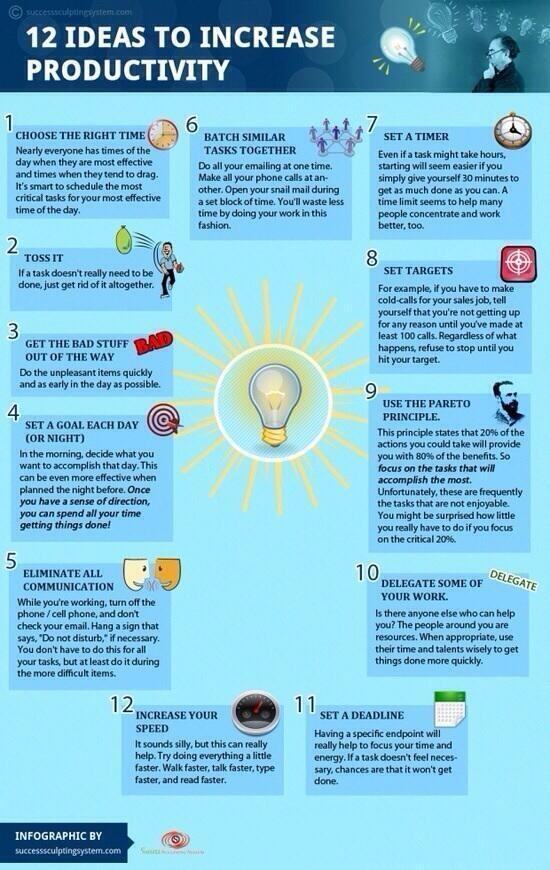
productivity tips

1- Book Creator for iPad
‘Book Creator is the simple way to make your own beautiful ebooks, right on your iPad.With over 30 million ebooks created so far, Book Creator is ideal for making all kinds of books, including children's picture books, comic books, photo books, journals, textbooks and more.’

2- Tell About This
‘Tell About This is an easy platform to inspire and capture children's thoughts and stories! They will love to explore and respond to any of the 100 interesting photo prompts using their voice. Craft custom prompts and add profiles to personalize the experience! Simple save/share options.’

3- SpakleFish
‘With SparkleFish you can record creative words in your own voice for playback inside surprising, ad-lib stories. If you enjoy Mad Libs, then you’ll really love SparkleFish. It’s fun for all ages, species, individuals, groups, etc.’

4- Pictello
‘Everyone loves to tell fun, engaging, and imaginative stories. Go ahead and make a social story or visual schedule for a child with autism or a slide show of holiday pictures for your friends’

5- Sago Mini Doodlecast
‘Sago Mini Doodlecast is a unique drawing app that records your voice as you draw. Capture every stroke, word and giggle. Perfect for children ages 2-6. Play back your drawings and share them with friends and family.’

6- Jumbled Sentences 3
‘Jumbled Sentences' series is designed for beginners to improve their writing skills. This app offers an easy and interactive way for beginners to learn the word order in a fun way’

7- iTooch 5th Grade
‘With more than 1,590 exercises, iTooch Language Arts Grade 5 is a new and fun way of practicing and learning Language Arts for 5th Graders.’

8- Writing Prompts for Kids
‘Boost students' creative writing skills with writing prompts that will spark their imaginations. This writing prompt generator is quick and easy to use; your students will have an inspiring writing topic in seconds.’

9- Little Story Maker
‘Little Story Maker offers a magical way to enjoy your personal pictures and stories with your child. The little ones will love to hear stories with pictures of people and places they are familiar with. Older kids, will love the stories and the ability to easily create stories all on their own.’

10- SpellBoard
‘SpellBoard provides a fast and intuitive way for you to enter your list of spelling words. All you need to do is enter the word (correctly spelled) and the grade level.’

11- Shake-a-Phrase
‘Shake-a-Phrase is a fun language app for creative writing prompts, vocabulary, and parts of speech practice. Perfect for learning and laughing in the classroom or on-the-go, it features over 2,000 words and definitions in 5 engaging themes for ages 8+.’

12- Little Writer
‘Little Writer is a tracing app that's done just right. Little Writer is super fun and so easy to use that your kids will think letter tracing is a game vs. a boring chore.’

12 Good Coding Apps for Elementary Students

12 Good Coding Apps for Elementary Students
May 15, 2017
In response to a request from one of our readers, here is a collection of some of the best iPad apps you can use with your elementary students to introduce and teach them coding and programming. This selection is based on our previous reviews as well as on the popularity of these apps among teachers and educators. You can also check this infographic featuring 12 excellent books designed specifically to help kids in their code learning journey. Links of the apps are under the visual. Enjoy

12 Good Coding Apps for Elementary Students

1- Kodable
‘Award-winning coding curriculum for kids! Kodable is designed to teach computer science to elementary students grades K-5 (Ages 4-11).’

2- Hopscotch
‘Learn to code by making things you enjoy playing. Our award-winning block-based language was built from the ground up to be used on your touchscreen iOS device. With Hopscotch, you get a blank canvas for your imagination, a community filled with inspiration, and an audience to begin using your products the moment you publish them’

3- Daisy the Dinosaur
‘Learn the basics of coding with Daisy the Dinosaur…This free, fun app has an easy drag & drop interface that kids of all ages can use to animate Daisy and make her dance on their screen. Kids will intuitively grasp the basics of objects, sequencing, loops and events by solving this app's challenges.’

4- Lightbot Junior 
‘Lightbot Junior is specifically designed for ages 4-8, and is an easier version of the popular Lightbot: featuring a gentler learning curve and not-as-complex puzzles. You can play as Boybot or Girlbot as you solve puzzles that use game mechanics that are based on Computer Science ideas…’

5- ScratchJr
‘With ScratchJr, young children (ages 5-7) learn important new skills as they program their own interactive stories and games.’

6- codeSpark Academy
‘codeSpark Academy teaches the basics of computer programming through a variety of interactive learning activities including puzzles, games, step-by-step creative projects, game design and offline printables – all of which can be monitored by parents.’

7- Move The Turtle
‘Move The Turtle is an educational application for iPhone and iPad that teaches children the basics of creating computer programs, using intuitive graphic commands.’

8- Cato's Hike: A Programming and Logic Odyssey
‘Cato is a little boy who just like every little boy likes to go out and play. One fine day Cato was playing outside when a portal to another world opened up in front of him; a portal to another world…Stuck that is until he finally discovered the rules in this universe: by writing a program for himself he would be able to overcome all obstacles and learn something new along the way!’

9- Boogie Bot
‘Boogie Bot is a fun and interactive learning app which will introduce kids to computer programming using Blockly - Google's visual programming language’

10- SpriteBox : Code Hour
‘SpriteBox is a unique puzzle-platformer; a mix of exploration and learning to code…During your adventure, you'll learn to sequence commands, change parameters, debug faulty logic, and use simple to complex loops to solve problems.’

11- Robot School. Programming For Kids
‘Robot School. Programming For Kids is a programming game suitable for children aged 7 and above. Try out free version of Robot School and get hooked into programming! ’

12- Tynker
‘Tynker is the easiest way for kids to learn programming. Play fun puzzles to learn the basics and then create your own amazing games using over 100 step-by-step coding tutorials. Great for Hour of Code! Additional puzzle sets available as in-app purchases.’

18 Great TED Ed Video Lessons for Social Studies Teachers

18 Great TED Ed Video Lessons for Social Studies Teachers
May 13, 2017
Today we spent sometime going through TED Ed lessons library and curated for you the collection below. These are video lessons created by teachers and educators covering various topics related to social studies. We used TED Ed categorization scheme to arrange these  videos lessons  into 3 main categories: Civics, History, and Geography. As is the case with any TED Ed lesson, videos included come with a number of questions and a discussion section to engage students in meaningful discussions of the video content. The links to these video lessons are included in a table below the visual.

This infographic is available for free download in PDF format.

18 Great TED Ed Video Lessons for Social Studies Teachers


Categories
TED-Ed Videos
Geography
History
Civics

An Interesting Infographic Featuring 10 of Stephen King's Writing Tips

An Interesting Infographic Featuring 10 of Stephen King's Writing Tips
May 11, 2017
In his classic On Writing: : A Memoir of the Craft, Stephen King opens up to his audience about the secrets behind his successful writing career. He talked about his writing habits and shared a number on interesting tips to help beginners thrive as writers.  We pulled out some of these tips and included them in the visual below for you to download and use with your students in class. This infographic is also available for free download in PDF format. Enjoy
  An Interesting Infographic Featuring 10 of Stephen King's Writing Tips

18 Good Chromebook Apps for Teachers

18 Good Chromebook Apps for Teachers
May 9, 2017
For those of you using Chromebooks in their instruction here is a collection of some good applications to try out with your students. These are tools that will enable you to: create timelines, design educational videos and tutorials, make beautiful posters for your class, engage students in digital storytelling activities, gather students feedback for formative assessment purposes and many more.  We have arranged these apps into the visual below which you can download in PDF format from this page. Links to the apps are included in a table placed under the visual.

18 Good Chromebook Apps for Teachers


Categories
Apps
Apps for creating videos
Apps for digital storytelling
Apps for creating timelines
Apps for taking notes
Apps for collecting students feedback
Apps for creating educational posters

18 Good Educational Android Apps for Teachers

18 Good Educational Android Apps for Teachers
May 5, 2017
We receive  a lot of emails from teachers using Android asking for app recommendations. It's true we do not cover Android apps as we do iPad apps but we do our best to strike a balance especially that cross-platform app reviewing is an extremely time consuming task. Our Android section, however, does have a decent number of helpful Android resources to check out. Today, we are sharing with you this handy visual featuring what we think are some useful Android apps teachers should try out. We have arranged these apps into different categories, go through the collection and share with us your feedback.
  18 Good Educational Android Apps for Teachers

20 Excellent Apps for University Students

20 Excellent Apps for University Students
May 5, 2017
As a a full time doctoral student, iPad is my number 1 companion. I use it for a wide variety of educational purposes but mainly for reading. I have been experimenting with various apps and the visual below features what I believe are some of the most useful apps university/ college students should definitely try. I arranged these apps into 10 categories and for each of these categories I cited two apps that go with it. I have also included a table below the visual where you will find links to the featured apps.
This visual is also available for free download in PDF format.
  20 Excellent Apps for University Students


Categories
Apps
Bibliography apps
PDF annotating apps
Note taking apps
Task management apps
Cloud storage apps
Content curation
Presentation apps
News aggregators
Personal organization
Reading apps